
CONCEPTConcept — not a commissioned project
Global Control: a concept operations CRM with a live simulation and a demo AI copilot
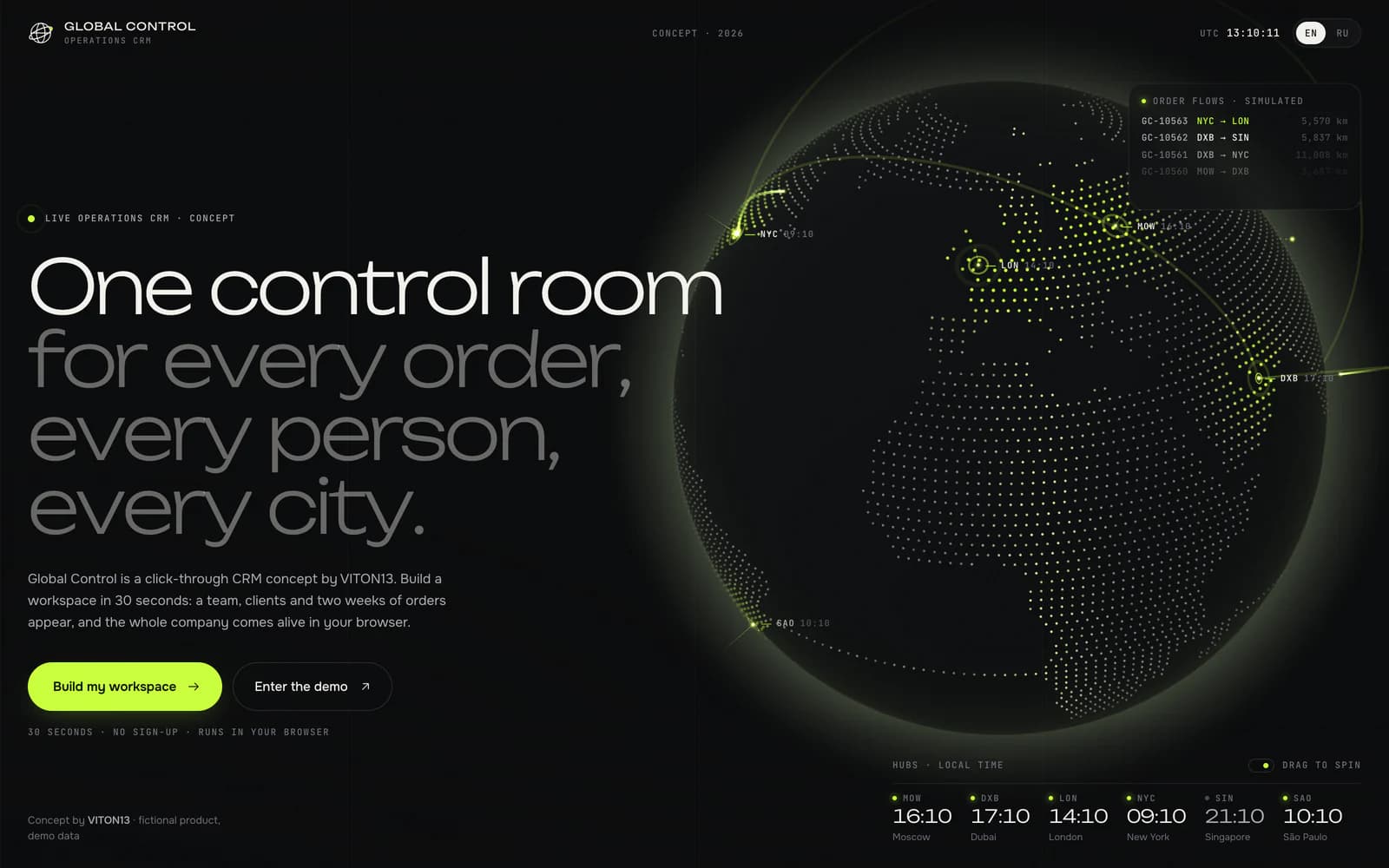
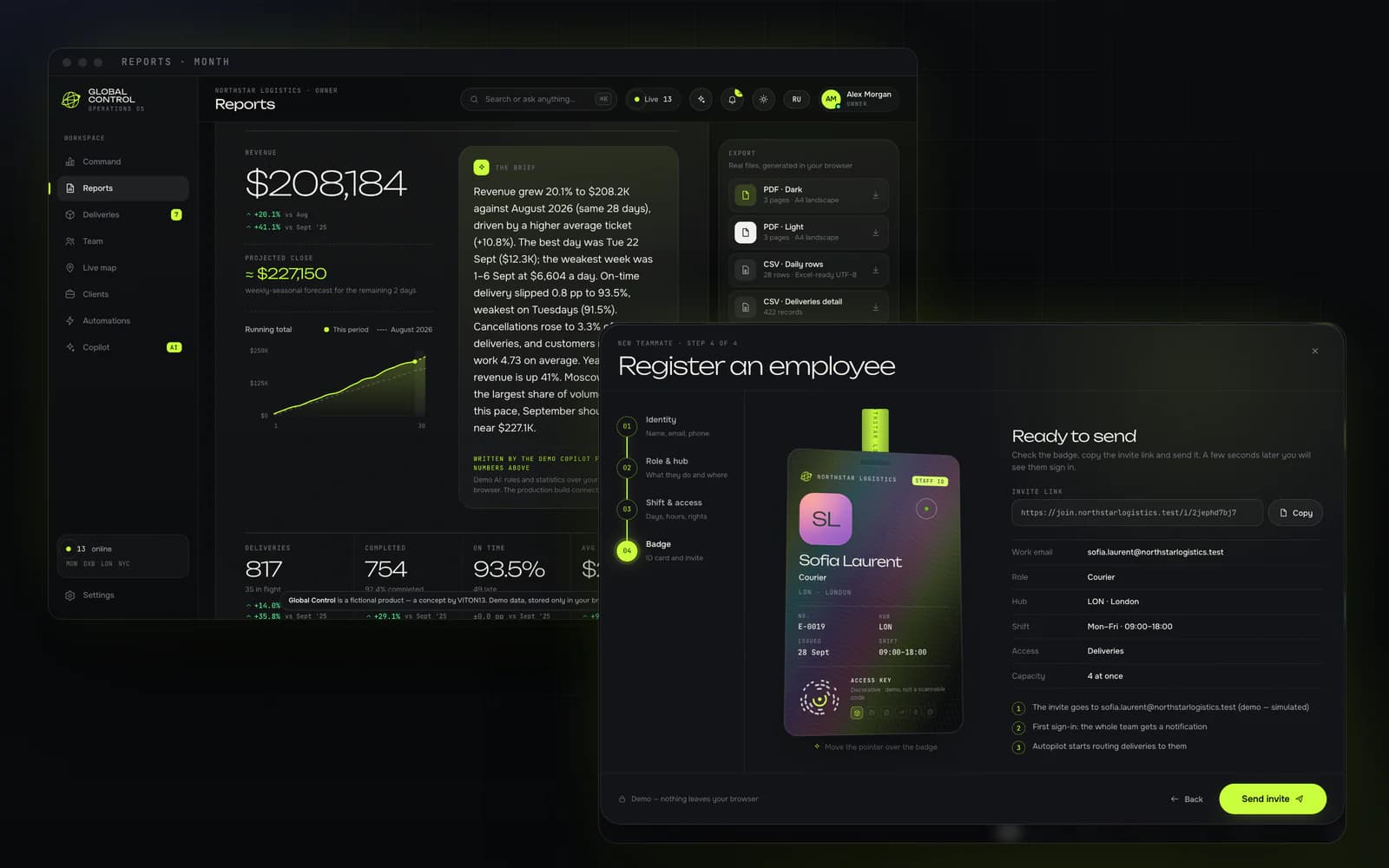
Global Control is an operations CRM VITON13 built as a concept, shown through Northstar Logistics, a fictional delivery company with hubs in Moscow, Dubai, London and New York. Every visitor builds their own sandbox in a short onboarding and gets a team, clients and two weeks of orders; a live simulation keeps the company moving while they dispatch orders, register people, read reports and talk to a demo AI copilot. Everything runs in the browser on generated data.
Open the live project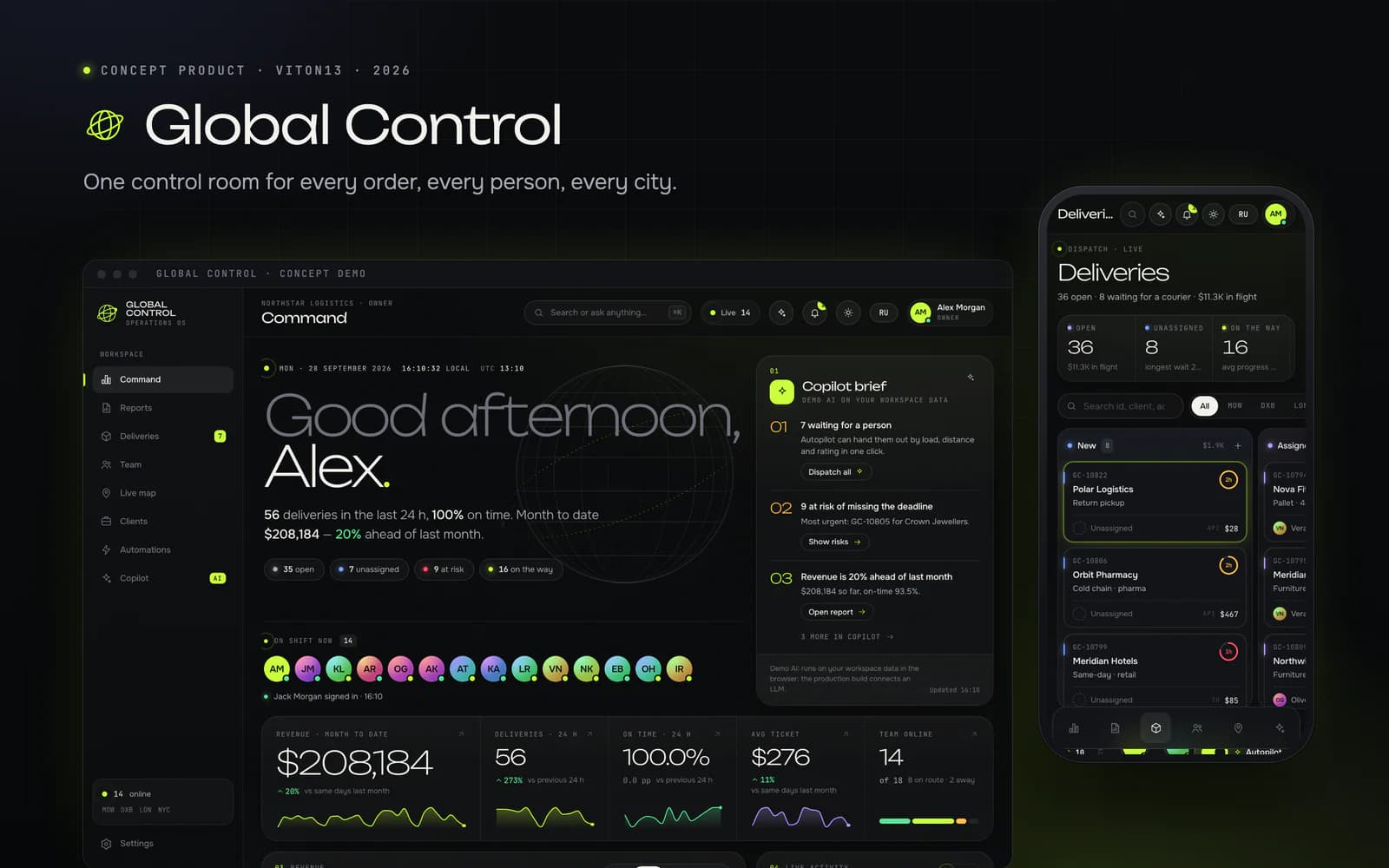
- working modules in one browser app, plus the intro and a ⌘K palette
- 9
- copilot intents, understood in English and Russian
- 35
- interface strings in each of English and Russian, none missing
- 2,045
- Lighthouse performance, mobile / desktop, on the live address
- 79 / 97
Task
VITON13 builds concept products to show how it approaches software for a business, not only websites. Global Control is the flagship of that series: an operations CRM for companies that dispatch people and orders across cities, shown through Northstar Logistics, a fictional delivery company with hubs in Moscow, Dubai, London and New York. The company, its people, its clients and its money are invented, and the demo says so on screen.
The brief was a premium CRM in which a manager registers employees, hands out orders, tracks them, reads indicators and charts, downloads monthly and yearly reports, gets a notification when someone signs in and works with an AI that adapts to the person. It also had to be a demo a stranger can play with: every visitor can click everything, create their own orders and people, and watch the company react.
What we did
The onboarding asks for a name, a role (owner, manager or employee), a company name, an industry, a team size from 8 to 30, a currency and an accent colour. A seeded generator builds the workspace from the answers: in the default demo, 18 people in four hubs, 22 clients, about 400 orders over 14 days and six automations, with a generated history behind them so monthly and yearly reports always have data. The industry changes the vocabulary everywhere (deliveries and couriers, jobs and technicians, or orders and pickers), the role changes the home screen (money and growth for an owner, the dispatch queue for a manager, “my day” for an employee), and the menu reorders itself by what the person actually uses. The simulation signs people in and out with a notification, brings in new orders, moves couriers along their routes and completes deliveries, with every hub on its own local time.
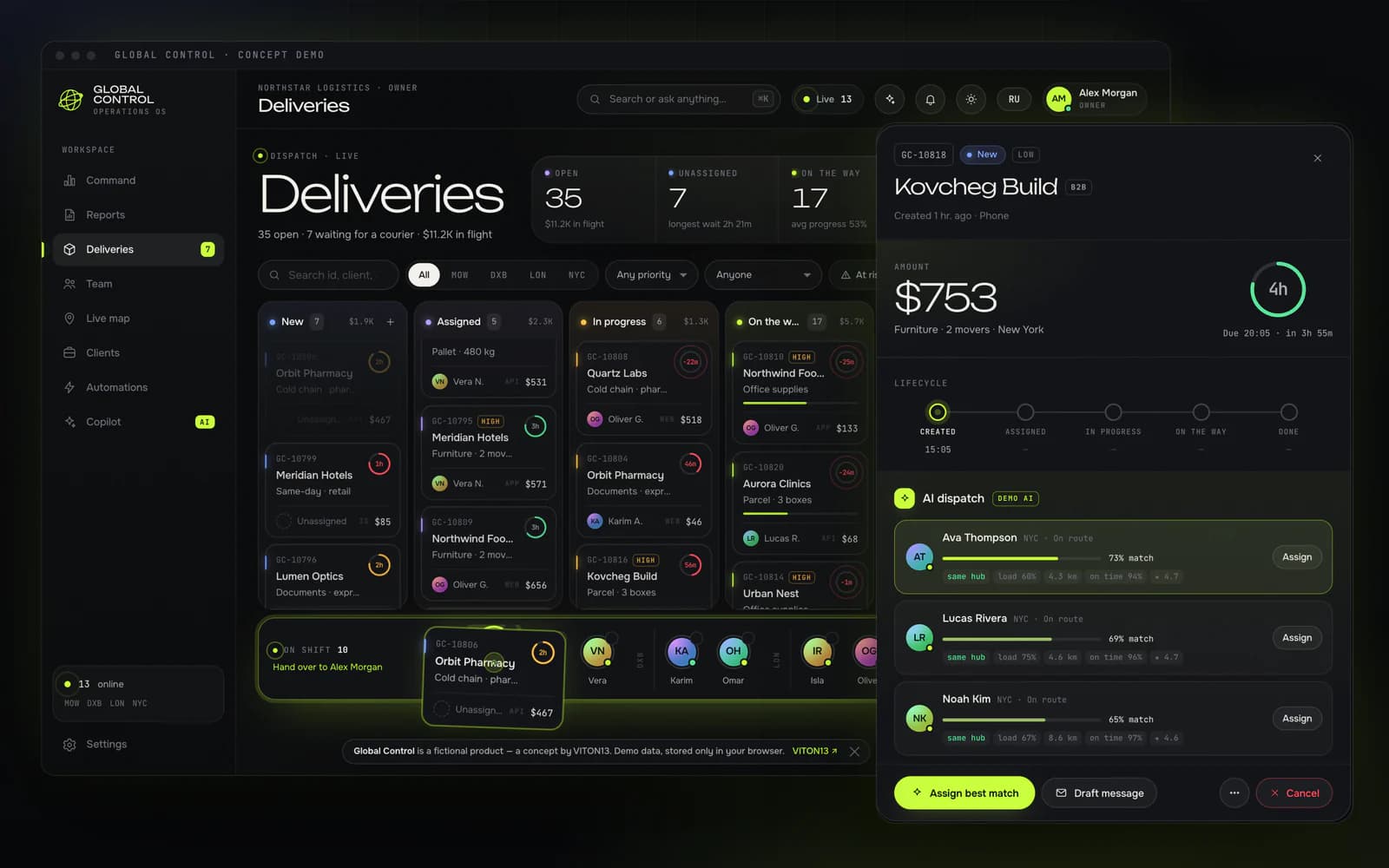
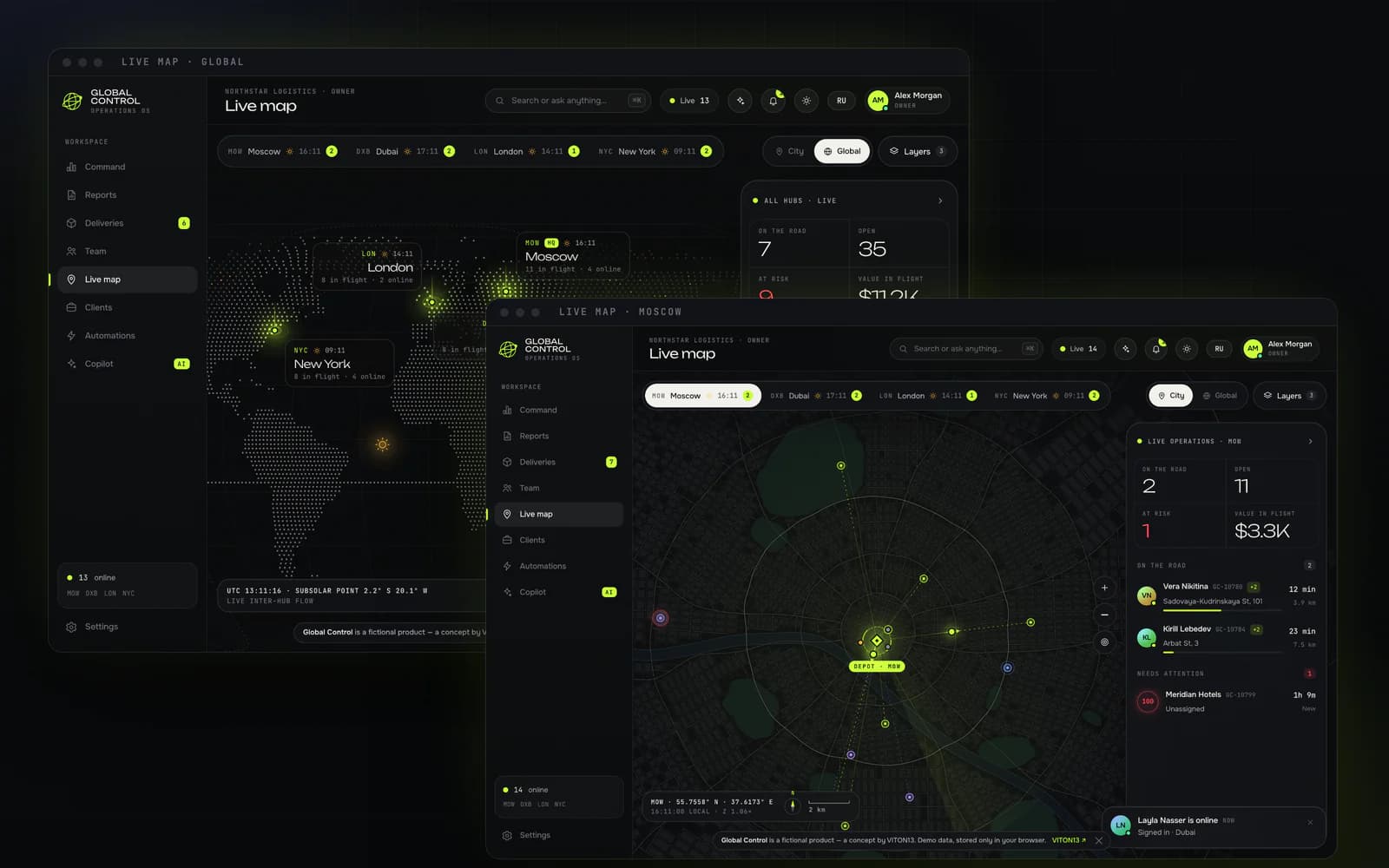
Orders is a board with drag and drop between statuses and onto people, a live SLA ring on every card, and a drawer in which AI dispatch ranks the team by hub, load, distance, on-time rate and rating and shows its reasons. Team registers an employee in four steps and ends with a holographic badge that tilts under the pointer; a few seconds after the invite, the new person “signs in” and the whole team is notified. The live map draws a procedural city for each hub with couriers moving through it, and a global view with the real day-and-night line. Reports cover a month, a quarter or a year and download as a PDF made by our own minimal PDF writer, as CSV that opens correctly in Excel in both languages, or as JSON. Automations run as live flows of nodes, and the builder turns a rule written in English or Russian into a trigger, conditions and actions, then replays it on the last 14 days. Clients carry an explainable health score.
The copilot is what we call demo AI, and the product labels it that way: an on-device language layer with typo-tolerant matching in English and Russian, 35 intents and entity extraction, which answers with live numbers from the workspace and acts through the same functions a person uses, from dispatching the queue to exporting a report. A proactive layer offers a one-click fix for an order at risk at most every 45 seconds, and ⌘K opens a command palette.
How it works
The app is plain JavaScript and CSS without a framework, bundled with esbuild into a static folder with relative URLs, so it runs from any path; on the portfolio it lives at /demos/global-control/. Every view is its own lazily loaded chunk, 43 files in all, and three.js is loaded only for the intro globe, with a 2D canvas fallback when WebGL is missing. One store holds the workspace and saves it in localStorage; every change goes through a small set of actions that emit events, so the views, the simulation, the notifications, the automation engine and the copilot react to the same facts without redrawing whole screens. The simulation ticks once a second, and canvas loops pause when a view closes or the tab is hidden.
The data comes from a seed, so the same answers give the same company: detailed orders for the last 14 days, a history generator for older days with weekly and seasonal patterns, and hubs whose activity follows their local working hours. Every number comes from one set of functions (KPIs for any range, daily and monthly series, a weekly-seasonal Holt forecast, the dispatch scorer), so the dashboard, the reports, the files and the copilot always agree. The PDF writer is ours: each report page is drawn on a canvas and embedded as a JPEG in a PDF 1.4 file with a proper cross-reference table, so Cyrillic just works; the CSV carries a byte-order mark and switches to semicolons and decimal commas in Russian, as Russian Excel expects.
The design is a dark control room with a day theme beside it: Unbounded for display figures, Onest for text and JetBrains Mono for labels, all self-hosted, hairline panels, one accent colour the visitor picks, and motion throughout, from letter-by-letter headlines to counting numbers, charts that draw themselves and a spotlight that follows the pointer; visitors who ask for reduced motion get instant changes. Both languages are complete: 2,045 interface strings each, with plural rules and the industry vocabulary.
What exists now
The concept runs at /demos/global-control/ with nine modules, the intro and a command palette, in English and Russian. On 28 September 2026 we checked it ourselves in headless Chrome on a local copy served with the portfolio’s production headers and content security policy: 13 routes at desktop and phone widths, the three roles, the Russian interface, the intro with the onboarding, and the main interactions (AI dispatch, a new order, a registration through to the badge, six copilot questions, ⌘K, a rule written in words, PDF and CSV exports) ran with zero console errors, zero CSP violations and zero failed requests. The monthly report came out as a valid three-page PDF and the daily CSV with one row per day.
The first script, app.js, weighs 3.3 KB gzipped; all 43 JavaScript files and the stylesheet come to 573 KB gzipped, 138 KB of it three.js for the intro. A first visit transfers 528 KB in 25 requests. On the live address, Lighthouse 13.5.0 (5 runs per device, medians, on a MacBook with a load average of 3–9) gave performance 79 on mobile and 97 on desktop, accessibility 100 and best practices 100; on a phone the score is held back by the largest paint, the intro’s subtitle, which appears at 3.7 s after a short preloader.
What this does not prove
Global Control is a concept VITON13 built to show range, not a commissioned project. Northstar Logistics, its people, clients, orders and money are fictional and generated in the visitor’s browser: there is no client, no users, no real deliveries, no traffic and no revenue, and nothing in the demo is for sale. Invites, messages, e-mails and sign-ins are simulated, and no data leaves the browser.
The copilot, AI dispatch, the forecasts and the rule builder are demo AI: on-device intent parsing, rules and statistics, not a language model, so they say nothing about how a model would do on a real operation. The simulation runs on compressed time. Every figure is a lab measurement in headless Chrome on one machine on one day: the walk-through ran on a local copy with the production headers, Lighthouse on the live address with a simulated phone, and no user testing was done. A production version would still need a server, accounts and permissions, real notifications, integrations and data protection.
SEO review
Measured on the live address on 28 September 2026. Lighthouse (5 runs per device, medians, on a MacBook with a load average of 3–9) gave performance 79 on mobile (LCP 3.7 s, 0.5 MB) and 97 on desktop (LCP 0.8 s), with accessibility and best practices at 100 on both. SEO is 63 because the demo is marked noindex, nofollow in the page and in the server header: it is a concept, and the page meant for search is its case on the portfolio.
Checked on 28 September 2026: 10 pages rendered in Chrome the way a search crawler sees them, plus Lighthouse 13 on the home page.
Lighthouse, home page
- Performance
- Mobile79Desktop97
- Accessibility
- Mobile100Desktop100
- Best practices
- Mobile100Desktop100
- SEO
- Mobile63Desktop63
On-page and technical checks
- Unique page titlesmissing1/10
- Title length 30–65 charactersin place10/10
- Meta descriptions 70–170 charactersmissing0/10
- One H1 per pagemissing2/10
- Page language declaredin placeen
- Mobile layout without sideways scrollin place390 px
- Images with alt textin place0 img
- Broken internal linksin place0
- Canonical URLmissing0/10
- Open Graph title and imagemissing0/10
- Structured data (JSON-LD)missing0/10
- sitemap.xml and robots.txtpartly1/2
Checked on the intro and the 9 views of the one address, rendered in headless Chrome at 390 px and 1440 px. In place: a title of 64 characters, the language declared (en, and ru after the switch), no sideways scroll at either width and 0 broken links among 11 targets (the nine views, studio.viton13.com and the portfolio case); there is no <img> to describe, because the globe, the maps and the charts are canvas and SVG. Partly: the intro and the map have one H1, the other 8 views have two (the view name in the top bar and the page headline). Missing: all 10 share one title and one description of 225 characters, and there is no canonical URL, no Open Graph image (only a title and a description) and no JSON-LD. robots.txt sits at the domain root; the demo is kept out of sitemap.xml on purpose.
If Global Control were a real product: keep the app behind a login and out of search, and give it a public site with a page per module (dispatch, live map, reports, automations, the copilot), each with its own title of 30–65 characters, a description of 70–170, a canonical URL and an Open Graph image; add JSON-LD (Organization, SoftwareApplication, BreadcrumbList, FAQPage for the questions buyers ask); keep one H1 per view inside the app; and list the public pages in sitemap.xml. On the live address the mobile score is held back by the largest paint, the intro’s subtitle, which appears only after a short preloader (LCP 3.7 s); showing it sooner is the next step for speed.
Services this case shows
Describe the task on the service page; a written scope, timeline and price come back within one working day.
Discuss a similar projectMore cases
All cases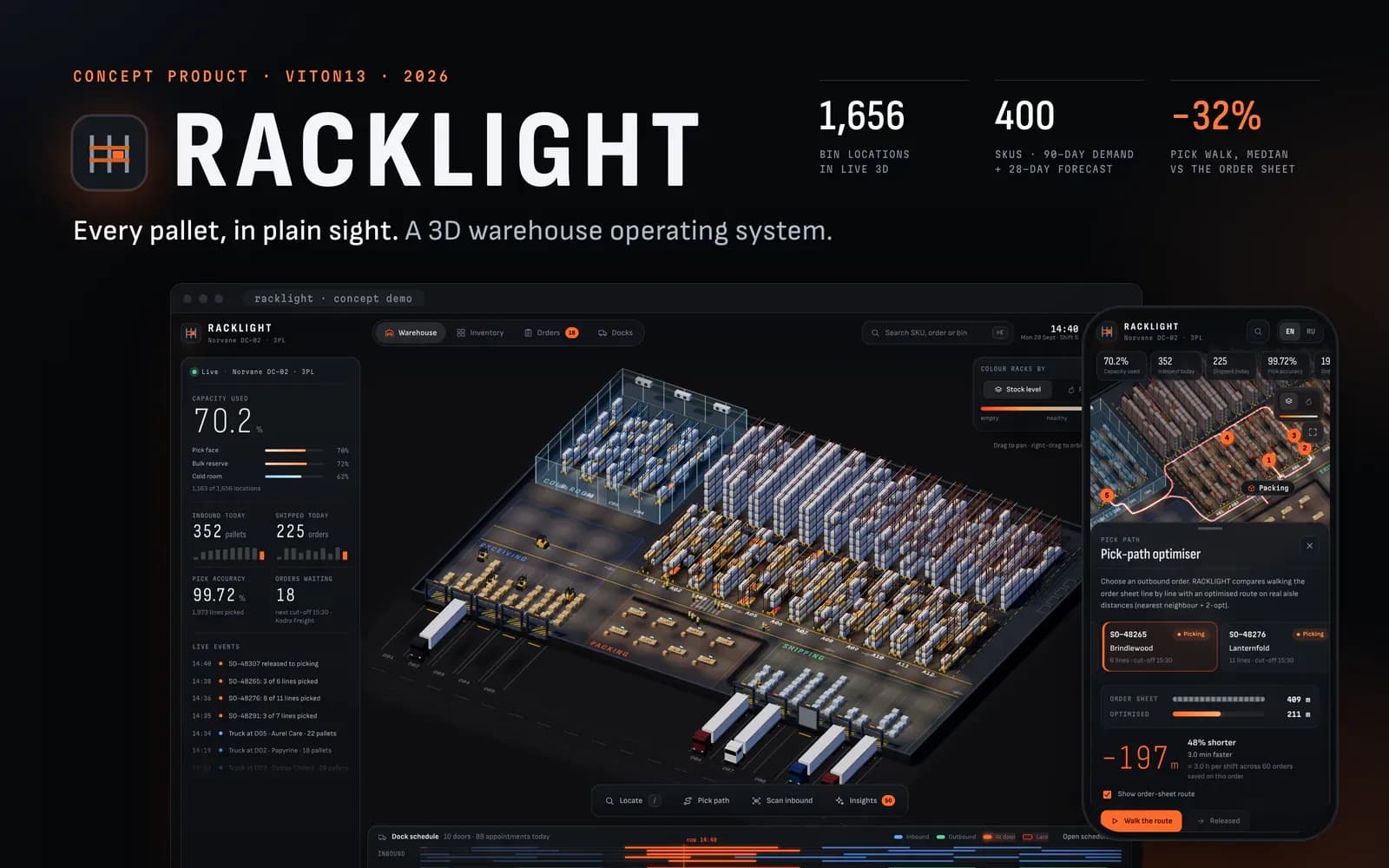
CONCEPTConcept — not a commissioned project
RACKLIGHT
Concept product · WMS · 3D · English and Russian · 2026
RACKLIGHT is a warehouse management system for Norvane DC-02, a third-party-logistics warehouse that does not exist. VITON13 built it as a concept to show what an operations product looks like when the warehouse itself is the interface: 1,656 bin locations as live 3D pallets, search that flies to any bin, a pick-path optimiser, inbound scanning with a putaway rule and demo AI for stock, which is rules and statistics in the browser and labelled as such.
Read the case →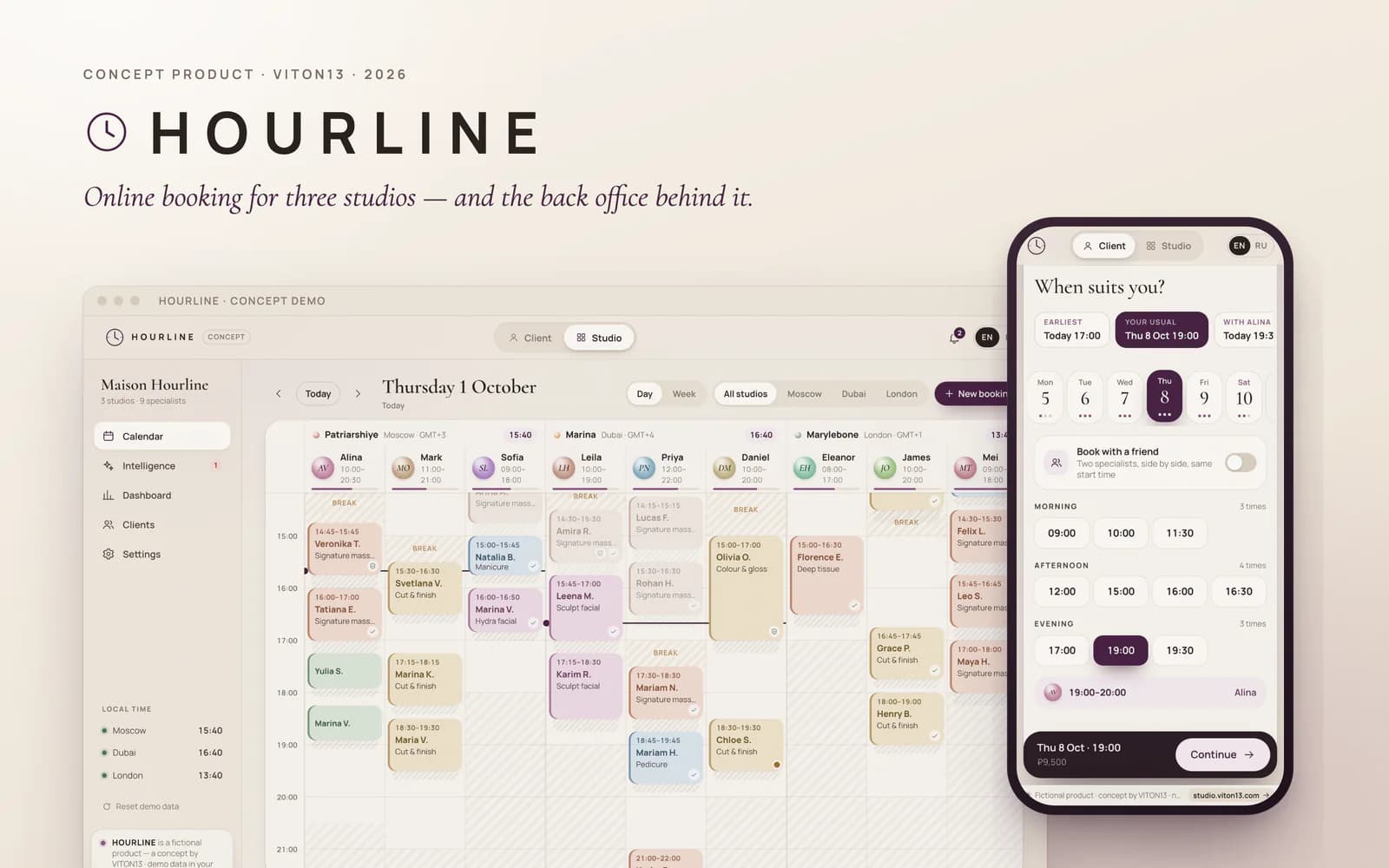
CONCEPTConcept — not a commissioned project
HOURLINE
Concept product · Web app · English, Russian · 2026
HOURLINE is an online booking platform VITON13 built as a concept, shown through a fictional network of three premium studios in Moscow, Dubai and London. One demo holds both sides: the page where a guest books a visit on a phone in seconds, and the back office where the studio runs its calendar, sees the risk of no-shows, fills empty time and reads its numbers. Everything runs in the browser on generated data.
Read the case →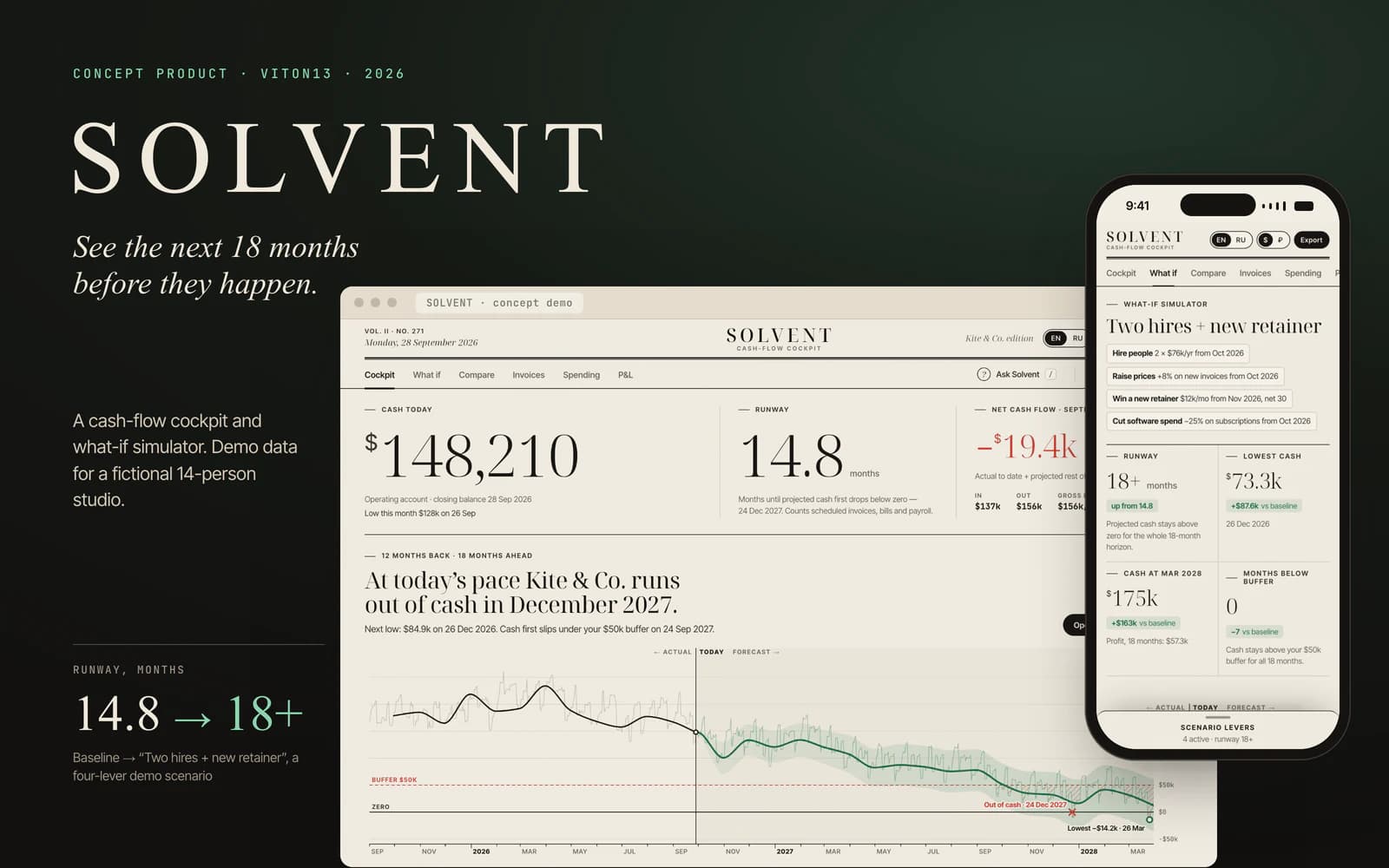
CONCEPTConcept — not a commissioned project
SOLVENT
Concept product · Web app · English, Russian · 2026
SOLVENT is a cash-flow product VITON13 built as a concept, shown on the books of Kite & Co., a fictional 14-person design-and-print studio. It tells the owner how much cash there is, how many months it will last and what the next 18 months look like, and lets them try a decision before making it: eight levers redraw the forecast at once, and a waterfall shows what each one changes. Everything runs in the browser on generated data, and it is not financial advice.
Read the case →